
- PlataformasWindows
- Edad3+
- CategoríaProductividad
- PrecioFree
También te puede interesar:


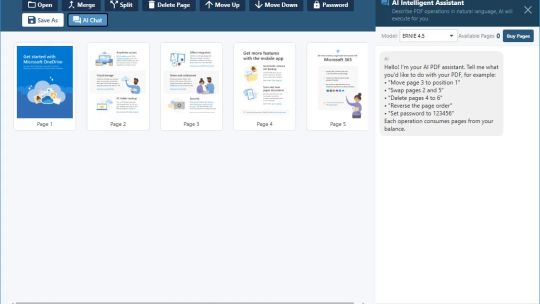
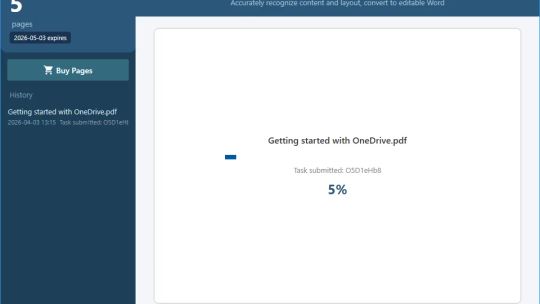

Starting from version 3.4.22, we have added a powerful AI intelligent feature module to the software. Rest assured, all the original basic functions of the software, such as PDF format conversion and PDF generation, will remain completely free, watermark-free, and without any functional restrictions permanently. Only the newly added AI-related functions (such as AI Smart Convert, AI Table Extraction, AI Summary, AI Text Extraction, etc.) are paid value-added services, which you can choose to use independently according to your needs.
A permanently free desktop PDF processing tool that covers all scenarios of two-way PDF conversion, while integrating industry-leading large AI model capabilities, meeting the free needs of individual users and the intelligent and efficient needs of professional users.
Core Feature Highlights
1. Permanently Free Basic PDF Processing (No Restrictions)
From PDF: Convert PDF to 10+ mainstream formats with one click, including Word/DOCX, Excel/XLSX, JPEG/PNG/TIFF images, TXT text, XML, RTF, HTML, XPS, etc., perfectly preserving the original document layout, tables, and image styles.
To PDF: Support one-click generation of standard PDF from Word, Excel, PPT, images (JPEG/PNG/TIFF), TXT, RTF, HTML, XPS and other formats, accurately restoring complex document formats.
PDF Manager: Built-in practical tools such as PDF merge, split, compress, encrypt, and watermark addition, meeting daily PDF editing needs in one stop.
2. New in v3.4.22: AI Intelligent Enhancement (Paid Value-Added)
AI Convert: For scanned, handwritten, and complex-layout PDFs, AI accurately recognizes content, achieving far better restoration than conventional conversion, perfectly preserving stamps, watermarks, and handwritten notes.
AI Table Extraction: Automatically recognizes complex table structures in PDFs, extracts them into editable Excel with one click, no manual format adjustment required.
AI Summary: Quickly generate core content summaries of PDF documents, extract key information from long documents in one click, improving reading efficiency.
AI Text Extraction: Accurately extract various text content from PDFs, support multi-language and special character recognition, solving the problem of text extraction from scanned documents.
AI Image→Word/Excel: Directly intelligently recognize content in images and scanned documents and convert them into editable Word/Excel documents, completely eliminating manual entry.
3. Technical & Experience Advantages
Stable and Efficient: Optimized core ensures smooth and stable operation, fully compatible with all Windows versions.
Flexible AI Model Configuration: Built-in multiple mainstream large models, support custom API configuration to adapt to different users' AI needs.
Lightweight & No Bundles: Small software size, no ads, no bundles, no pop-ups, pure experience.
Multi-Language Support: Support multi-language interface switching to meet the needs of global users.
Continuous Update & Maintenance: Continuously optimize function experience, ensure permanent availability of free functions, and continuously iterate AI functions.
Target Users
Students & Office Workers: Meet daily PDF format conversion and generation needs for free, efficient office work at no cost.
Professionals: Efficiently process scanned documents, complex documents, and batch table extraction through AI functions, greatly improving work efficiency.