
- PlatformsWindows
- Age3+
- CategorySecurity
- PriceFree
You may also like:



The free version of the app is to help evaluate if the app meets your needs. We kindly request avoiding negative reviews regarding the free app limitations.
Thank You for 700K Downloads – Your Feedback Has Been Incredible!
Introducing Secure Folder, Files and Encrypt – the ultimate solution for locking your sensitive files and folders on Windows 10/11. With powerful encryption and intuitive features, Secure Folder App provides a robust defense against unauthorized access, ensuring your valuable data remains private and protected. Our Folder Protection Software offers folder locking and file encryption capabilities, ensuring your data remains hidden and protected.
Key Features:
🔒 File and Folder Locking functionality: Easily lock down your confidential files and folders with just a few clicks. Secure Folder adds an extra layer of protection, preventing prying eyes from accessing your private information. (Note: The free version allows you to lock folders containing up to 30 files.)
🔐 Advanced Encryption: Take your security to the next level with state-of-the-art encryption algorithms. Secure Folder, Files and Encrypt employs advanced encryption techniques to ensure that your data is virtually impenetrable, giving you peace of mind.
🌐 Seamless Windows 10/11 Compatibility: Tailored specifically for Windows 10 and 11, Secure Folder integrates effortlessly into your operating system, providing a smooth and native user experience.
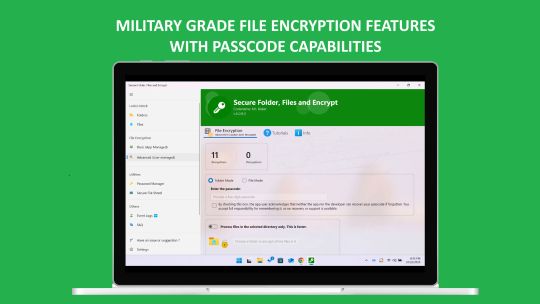
🔒 Comprehensive File Encryption: Encrypt and decrypt all files within a folder, offering comprehensive protection for your digital assets.
🔐 File-Specific Encryption with Passcode: Choose specific files (e.g., .mp4, .jpg, .jpeg, .png, .avi, .mov, and more) and encrypt them with a personalized passcode. No other program will be able to view or open these files without the correct passcode.
🔄 Passcode-Protected Encryption and Decryption: Encrypt any file type with a passcode, ensuring that only you have the key to access your secured files. Decrypt your files later with the same passcode, offering seamless security.
Download Secure Folder, Files, and Encrypt now to lock and protect your files and folders. Experience peace of mind with absolutely no ads.
Note: The free version allows you to lock folders with up to 30 files for an unlimited time. This limitation is designed to help you explore and evaluate the app's features to see if it meets your needs. If you require additional functionality, consider upgrading to the full version. We kindly ask that you refrain from leaving a negative review solely based on this limitation, as it is clearly stated upfront. Thank you for your understanding!
Try it now!
Tags:
Lock Folder in Windows PC Password Protect Folder on Windows
Password protect folder in Windows 10, Windows 11
Lock folder in windows 10,11 with password
Secure data on Windows PC
Folder Protect and locking app, folder security, how to lock folders, and secure files/folders on Windows
Folder Protect and Lock Software
Secure Folder App
File Encryption
Folder Protection Windows
Secure Folder Tutorial
Protect Files Windows
Folder Locking App
Secure Folder Setup Guide
Best File Protection Software
Data Security Windows
Lock Files Windows
File Protection App
Secure Files Easily
Privacy Protection App
Data Encryption
Windows File Security
Secure Folder Review
Privacy and Security App