
- PlatformsWindows
- Age3+
- CategoryPhoto & Video
- PriceFree
You may also like:


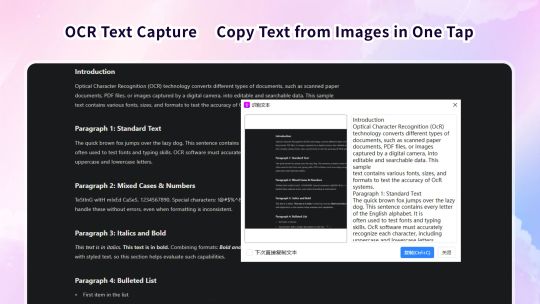
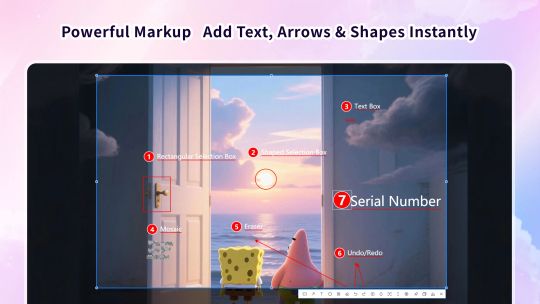

This is a modern screenshot and annotation solution tailored for you. We have integrated all the core functions you need: from one-click screenshots to advanced annotations, and even the unique window pinning feature. Whether you need to add comments to work reports, create clear tutorial guides, or protect private information before sharing, it can be your reliable assistant!
【Main Features】
- Capture Screenshots
- Capture full screen, active windows, or any custom area.
- Use custom shortcuts to launch screenshots anytime, anywhere, without missing any moment.
- One-click to "pin" screenshots on the screen, making it easy to refer to them while handling other tasks.
- Edit and Annotate
- **OCR text recognition**: Recognize text in screenshots with one click and copy it easily, eliminating manual input.
- Custom watermarks: Easily add your text watermarks to protect the copyright of your works.
- Rich shapes: Provide rectangle, circle, arrow, line, and freehand brush tools.
- Text tool: Add text descriptions to screenshots to convey information clearly.
- Privacy protection: Use mosaic or blur tools to hide sensitive information in screenshots with one click.
- Serial number marking: Easily add sequential numbers to your screenshots, ideal for creating step-by-step guides.
- Unlimited undo/redo: Made a mistake in editing? Easily undo and redo operations, allowing you to edit with confidence.
- Shortcut support: Customize global shortcuts to wake up at any time, without missing any moment that needs to be captured.
- Save and Share
- One-click to copy the edited screenshots to the system clipboard, making it easy to quickly paste them into WeChat, emails, Word, and any other places.
- Support saving screenshots as files in various formats such as PNG and JPG, and you can customize the default save path.
- Coming Soon
- HD screen recording: Update next week! Easily record product demonstrations, online courses, and operation processes to make dynamic communication simpler.
⚠️ The current version is the free acquisition version, which includes restrictions on the long screenshot function. If you are satisfied with the product, you can experience the complete product functions by purchasing relevant in-app services. You can choose to subscribe to the software monthly or annually, and the fee will be deducted from your Microsoft account at the renewal time. You can also choose to purchase a permanent membership, pay once, and use it permanently.