
- PlatformsWindows
- Age3+
- CategoryMultimedia Design
- PriceFree
You may also like:

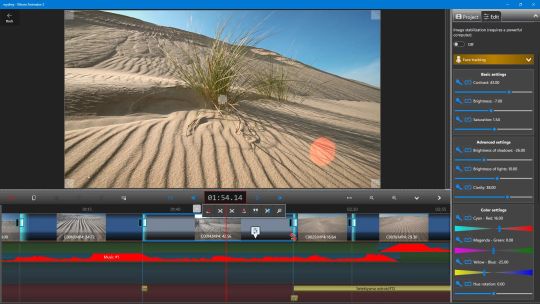


Movie Animator 3 is the latest, third version of the tried-and-true movie editor known as 'crazy video maker.' This editor has gained widespread popularity and is installed on nearly two million Windows 10 and Windows 11 devices.
Movie Animator 3 is an advanced yet incredibly easy-to-use movie editor. You don't need any prior knowledge of video editing to create a stunning movie composed of photos, videos, sounds, animated text, video effects, videos from a built-in camera, or a recorded computer screen. Working with this program primarily involves moving events on the timeline using a mouse, stylus, or touch and setting their parameters. All project elements are arranged in layers, which you can freely control. The latest version is integrated with AI, allowing you to create and modify movies and photos directly from the program.
Despite its simplicity, the program offers professional editing capabilities. With it, you can:
- create your own movie from other movies or photos,
- modify photos and movies using artificial intelligence,
- precisely crop component movies down to a single frame,
- record your computer screen and edit it with your movie,
- precisely crop photos and movies with image stabilization,
- adjust the brightness, contrast, saturation, and color balance of component photos and movies,
- freely level or rotate photos and movies,
- display photos and movies on layers using multiple alpha mask modes,
- add professional transitions,
- speed up and slow down movies,
- add animated GIFs with special effects,
- freely draw on your movie with a mouse or stylus,
- add dozens of types of animated text to your movie,
- apply many stunning filters and video effects to any part of your movie,
- add video effects from an online movie library,
- add any number of soundtracks to your movie,
- record audio for your movie Video from the built-in or attached microphone,
- add audio effects such as echo, reverb, and equalizer,
- record and edit a video from the built-in camera,
- insert another project into the current project (this allows you to create video templates),
- apply the Chroma Key (Blue/Green Box) effect,
- precisely set the parameters of the exported video (audio/video bitrate, frames/sec),
- export FullHD and 4K/8K videos (paid version),
- share the created video on YouTube directly from the program.
You can see the effects of all options immediately in the preview of your video, giving you full control over the creative process.